
A product that answers questions about photos needs image capture, display, speech and networking to work together. Before selecting components, define how users start a request, what images the device captures and how the result returns.
The AI Hardware Selection Guide 2026, page 13, describes the smart camera design. This article uses that description to explain component selection. Camera parameters and model capabilities the document leaves unspecified still need confirmation.
Controller and complete-device components
The hardware guide lists ESP32S3R8 + 16Mflash + VB6824 — an S3-based design with voice hardware. The exact chip, storage units and board revision should be checked against the bill of materials.
Ask the supplier what “16Mflash” means; it cannot yet be treated as a confirmed 16 MB specification. Check the actual board configuration for the interfaces supplied.
| Component | Documented description | Details to confirm |
|---|---|---|
| Main board | ESP32-S3 series with VB6824 | Full part number, storage specifications and interface assignments |
| Camera | Listed as a main accessory | Sensor, resolution, interface and driver |
| Display | 2.0-inch screen | Resolution, interface and displayed content |
| Audio | Microphone and speaker | Specifications, mounting, and recording and playback in the complete product |
| Power | Battery pack | Capacity, charging design and operating conditions |
| Mechanical accessories | Lens and cables | Drawings, positions and connections |
| Options | 4G and storage card | Whether included, matching module and firmware support |
Optional items are not standard kit contents. Confirm whether the sample is a basic camera kit or a version with 4G and storage card hardware installed and supported by its firmware.
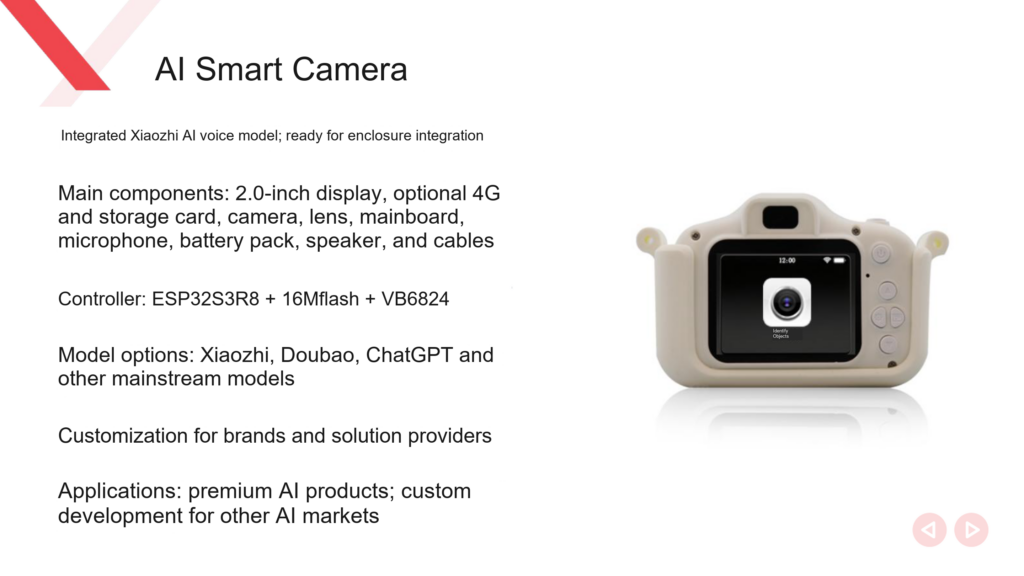
Camera: Check captured images against the task
The guide does not specify the camera model, pixel count, field of view or frame rate. It does not establish HD video recording, face recognition or other unlisted features, and it does not show that all ESP32-S3 camera modules are interchangeable.
For text or object photography, provide the intended distance, object size and lighting conditions. Have each candidate capture sample images, then check whether they meet the task’s needs. Pixel count is only part of the selection information.
Image capture and correct AI interpretation are separate tests. Save a real captured image and check exposure, orientation and clarity before testing transfer and processing. This sequence helps locate failures.
Display: Specify more than size
The 2.0-inch measurement describes size. Resolution, interface and refresh behavior still need confirmation. Decide whether the screen shows menus, previews, status or results, and whether it must refresh continuously during photography and voice interaction.
After integrating the display and camera, test them together. Show the intended content while capturing images and check for visual errors or interrupted functions. The guide provides no concurrent test results, so the prototype must supply them.
Match the screen opening and lens position to the mechanical design. Confirm the actual accessories and mounting dimensions before designing the enclosure to reduce rework if the screen changes.
Audio: Define the interaction sequence
The design lists VB6824, a microphone and a speaker. For voice-triggered photography, define the phrase that starts the interaction, when the photo is taken, what happens while processing is pending and how the result is spoken.
The hardware needs matching firmware and services. Confirm support separately for interruption during playback, custom wake phrases and error prompts.
Start with a fixed prototype sequence: the user makes a request, the device captures an image, displays or speaks its status, receives a result and finishes. Demonstrate only the capabilities currently connected and working.
Connectivity: Check 4G and model integration separately
The camera documentation lists 4G as optional but omit the module model, frequency bands, carrier requirements and switching procedure. The AI-C5 BOOT button instructions therefore cannot be applied directly to this S3 camera.
The documentation also lists Xiaozhi, Doubao and ChatGPT as model or service options. Confirm the integration for each; their names do not establish image-input support in the installed firmware. Check the image interface, account authorization, quotas and result return path.
To test photo questions and answers, submit a complete request using an image captured by the device. Verify that the service accepts and processes the format and returns the result to the device. A working network connection is only one part of that test.
Organize prototype acceptance tests
Proceed in dependency order:
- Power up and check basic board, display and audio operation.
- Capture images separately and assess sample quality in the target setting.
- Connect to the intended network and confirm service configuration.
- Run one complete product interaction.
- Repeat on the same hardware, including disconnection, restart and reconnection tests.
- Fit the intended enclosure and retest display, audio capture and image quality.
Before freezing the product specification, obtain the camera parameters, storage format and server documentation, then finalize the bill of materials and acceptance conditions. While those details remain unresolved, continue design discussions without locking the configuration.
Related reading
- Comparing Xiaozhi AI development boards
- Changing the VB6824 wake phrase
- AI-C5 network switching guide (an example for a different board, not operating instructions for this camera)
Sources
- DOIT AI Hardware Selection Guide 2026 (PDF), page 13.
Leave a Reply
You must be logged in to post a comment.