
Choose a Xiaozhi AI dev board according to the product’s task. A voice plush toy needs a working conversation loop first; dual-screen expressions and image capture involve display and camera adaptation; keeping the device usable away from home Wi-Fi calls for a connectivity plan. Once these requirements are clear, you can compare boards and accessories.
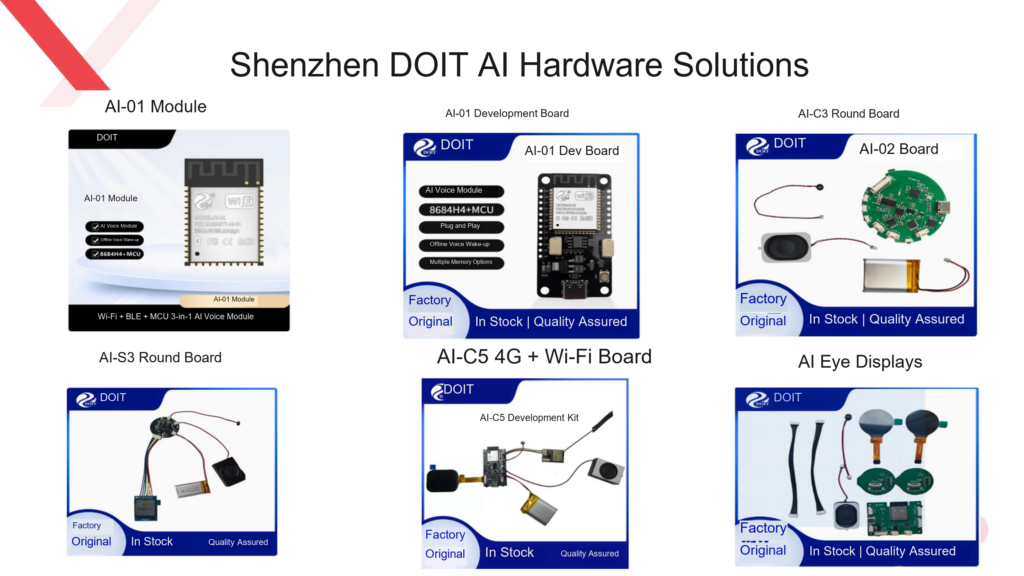
This article draws on the Shenzhen DOIT AI Hardware Selection Chart 2026 and the DOIT AI Development Handbook v1.0, comparing the DOIT finished boards and module options described in those materials. The capabilities listed in the table belong to the specific options shown — they cannot be assumed for every board built on the same chip.
What needs do the four options serve?
| Option | Key configuration or features (per source materials) | Products to evaluate first |
|---|---|---|
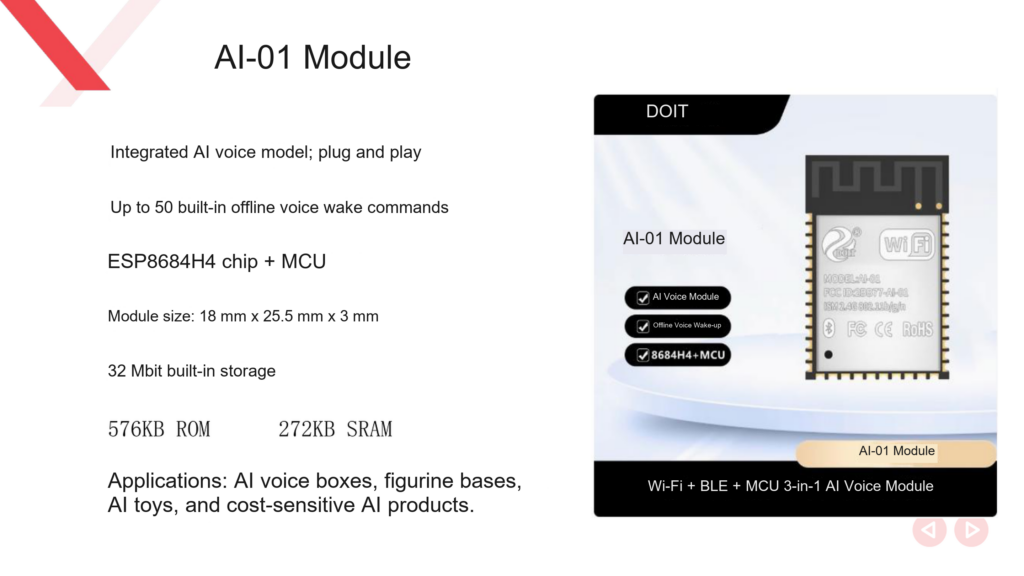
| C2 / AI-01 | ESP8684H4-series MCU paired with offline voice processing; available as a module or a dev board | AI voice boxes, figure bases, basic voice toys |
| C3 / AI-02 | ESP32-C3 paired with an offline MCU; round and square boards, with optional display and audio accessories | Storytellers, desktop pets, AI fridge magnets |
| S3 | ESP32-S3R8-series design; the materials also list dual-lens dual-screen and smart-camera form factors | Expression desktop pets, smart plush toys, devices with display or imaging features |
| C5 | AI-C5 supports both 2.4 GHz and 5 GHz Wi-Fi, plus an optional 4G module | AI terminals that need mobile connectivity |
For a product that only does voice Q&A, prototyping with the AI-01 or C3 option first reduces the work of debugging a display and complex peripherals at the same time. This is a function-matching suggestion; the actual cost still needs to be estimated from a full bill of materials.
How do modules, dev boards, and finished boards differ?
Modules suit projects that need a custom baseboard, connectors, and enclosure structure. For the AI-01, the selection chart lists the module dimensions, while the development handbook notes that the AI-01 dev board can be used for development and validation. Choosing a module means the project still has to complete the peripheral circuitry and whole-unit integration — a module quote is not the cost of a finished product.
Dev boards are better for getting firmware running, serial debugging, and service integration. The AI-01 dev board has no onboard USB-to-serial function, so a separate serial adapter is required. Differences like this affect the onboarding flow and should be confirmed before purchase.
Finished boards are closer to full assembly: confirm how the display, speaker, microphone, battery, and cabling go together before designing the enclosure. The “drop-in enclosure” wording in the materials still requires whole-unit validation, especially the microphone openings, the speaker cavity, and the button positions.
List requirements separately for displays, dual screens, and cameras
Display requirements should state the screen size, resolution, interface, and content shown, plus whether an animation plays during voice conversations. Simple status indicators, continuous animation, and two-eye coordination each need their own validation plan.
For a smart camera, also confirm the camera module, image transmission, and the server-side image-recognition flow. The existence of an S3-series camera product does not mean any S3 board can take any camera directly. When purchasing, ask for the interface and adaptation documents for the specific board.
Check the full SKU and delivery list when ordering. The largest display spec in the selection chart may be an optional configuration; the AI-C5 example in the development handbook has specific screen parameters — the two should not be conflated as the current kit’s standard configuration.
Connectivity choices change where the product can be used
A device that stays fixed at home can be designed around Wi-Fi first. A device used outdoors calls for evaluating the 4G module, antenna, power supply, and network service conditions.
AI-C5’s support for 4G does not mean every C5 board you buy comes with working cellular service. Confirm whether the delivery includes the module and a matching antenna, which networks apply, and the connectivity service terms. The mode switching described in the materials also depends on firmware and button state — do not assume a seamless automatic fallback after the network drops.
Before ordering, compare options with one requirement sheet
Give the vendor the product form factor, display content, connectivity environment, and expected delivery model, then ask each candidate option to answer these questions:
- Which accessories are included in the quote, and which cost extra?
- Which hardware revision, firmware branch, and board configuration does it correspond to?
- Which parts handle wake-word detection, real-time interruption, and cloud conversation?
- Can you provide wiring diagrams, flashing instructions, and materials for secondary development?
- What performance should be verified after prototyping, and how are acceptance criteria recorded?
“LLM supported” should be read as “model service integration still to be confirmed” — it does not mean a large language model runs offline on the board. Offline voice commands and connected open-ended Q&A should be accepted separately.
Once a candidate board is settled, complete power-on, connectivity, wake, conversation, and restart re-tests — check that the board configuration meets the product’s needs before moving on to enclosure design.
Further reading
- How to choose an AI toy hardware design
- A guide to switching between 4G and Wi-Fi on the AI-C5
- AI smart camera hardware configuration explained
Sources
- Shenzhen DOIT AI Hardware Selection Chart 2026 (PDF), pages 3 and 6–13.
- DOIT AI Development Handbook v1.0 (PDF), pages 13–16 and 107–116.
Leave a Reply
You must be logged in to post a comment.