
Real-time interruption lets a user speak while the device is still answering. The system must detect the new input while handling the echo created when the microphone picks up the speaker’s output.
AEC stands for acoustic echo cancellation. Espressif describes it as removing speaker playback echo from the microphone input, for uses including voice wake-up and full-duplex interaction. This explains the general principle; it does not establish that DOIT boards use the same ESP-SR implementation. See the Espressif AEC documentation.
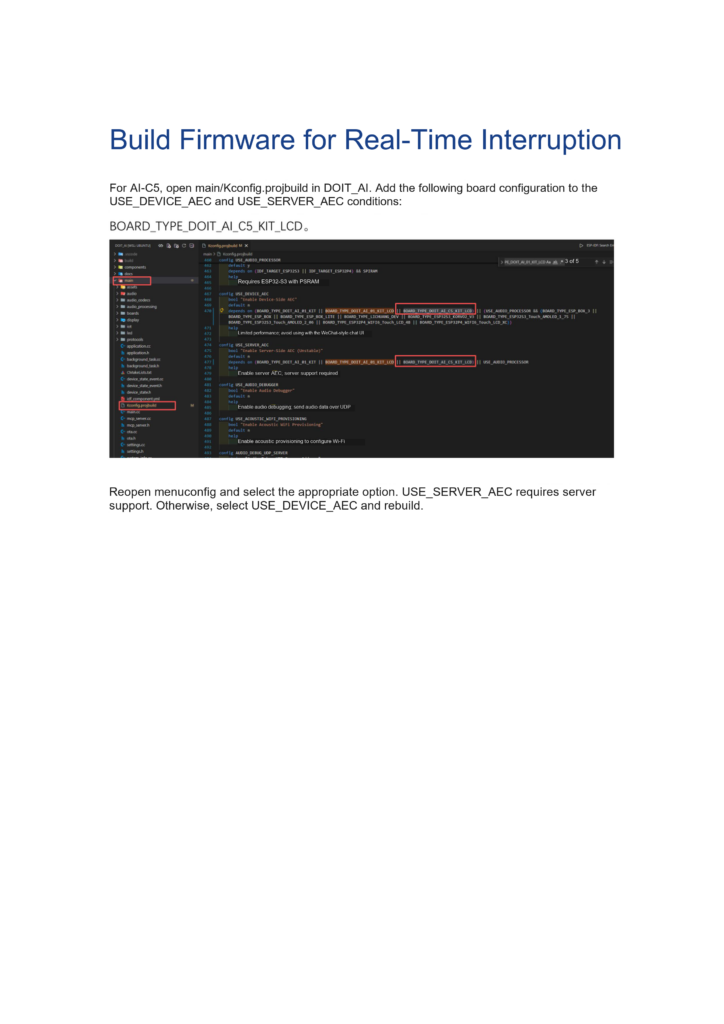
The board configuration below follows page 122 of the DOIT AI Development Handbook v1.0 and uses AI-C5. Check support conditions separately for other boards.
AEC and interruption need separate checks
AEC addresses acoustic echo. Interruption also requires firmware to stop the current playback when it detects new input, then pass the next request to the conversation service. Successfully compiling an AEC option does not verify that complete behavior.
Test interruption by wake phrase separately from interruption by ordinary speech. A demonstration of wake-up during playback does not establish that any speech can interrupt without a wake phrase.
Before changing AEC settings, decide which interaction you need and verify ordinary wake-up and conversation on the device. Changing AEC while the basic audio path is still failing makes troubleshooting harder.
Device-side and server-side AEC
| Option | Configuration name in the handbook | What to confirm first |
|---|---|---|
| Device-side AEC | USE_DEVICE_AEC | Support in the board, audio implementation and firmware |
| Server-side AEC | USE_SERVER_AEC | Support in the conversation server |
The handbook says USE_SERVER_AEC requires server support. If the server does not support it, select USE_DEVICE_AEC and rebuild, provided the hardware supports the device-side implementation.
Choose according to the board and server you will deliver. The documents provide no measured latency comparison and do not say that enabling both options improves results. Follow the instructions for the supplied configuration.
Configure the AI-C5 example
Save the project revision and configuration that currently support normal conversation so you can compare them if the new settings fail. Then inspect main/Kconfig.projbuild in the DOIT_AI project.
On page 122, the handbook adds BOARD_TYPE_DOIT_AI_C5_KIT_LCD to the board support conditions for USE_DEVICE_AEC and USE_SERVER_AEC, then reopens menuconfig to select the appropriate option.
Follow these checks when applying the change:
- Check whether the project already includes this board support. Do not add it twice.
- Preserve other hardware restrictions in the full condition expression. Do not remove dependencies just to expose a menu item.
- Choose the AEC option that matches server support.
- Save, rebuild and flash using an environment configured for AI-C5.
- Restart, confirm normal conversation, then test interruption.
Kconfig conditions can differ between project revisions. Compare the complete current configuration before editing. Copying a single line may break existing conditions and produce firmware that compiles but does not work on the hardware, so this guide does not provide a whole replacement block.
Test interruption behavior
Have the device play a sufficiently long answer. Try interrupting at a fixed distance and volume, recording the action and result. Check each stage: detection of the input, stopping the previous playback and processing the new request.
| Test scenario | What to observe |
|---|---|
| Quiet room, no device playback | Normal wake-up and audio capture |
| User gives the agreed input during playback | Whether playback stops and a new conversation begins |
| Continuous device playback, user silent | False triggers or self-interruption |
| Different speaker volumes | Interruption consistency and recognition errors |
| Greater distance or background noise expected in use | Whether the behavior meets actual use requirements |
These are proposed prototype tests, not measured board performance. Record the hardware revision, firmware revision, server, distance, volume and successful attempts so the results can be repeated and compared.
Troubleshoot missing options or poor results
If the option is missing from the build menu, check the chip target, board selection and configuration dependencies. If compilation succeeds but normal conversation fails, restore the basic audio path, inspect device logs and then review the newly enabled settings.
If interruption works only at low volume, investigate audio capture, the playback reference and the assembled product’s acoustics. If server-side AEC performs poorly, check the server’s capabilities as well as the device configuration.
Keep test conditions fixed and change one item at a time. Record each result to distinguish effects from firmware, service settings and hardware construction.
Related reading
- Changing the VB6824 wake phrase
- Development setup and the first flash
Sources
- DOIT AI Development Handbook v1.0 (PDF), page 122. Configuration conditions were checked against the original page screenshot.
- The Espressif documentation linked above explains AEC principles. This article does not report physical performance tests on AI-C5.
Leave a Reply
You must be logged in to post a comment.